
Your Turbo Oxygen.
Made simple.
Setup. Operation. Safety. Care.
Everything you need to feel
confident
with your EWOT System.
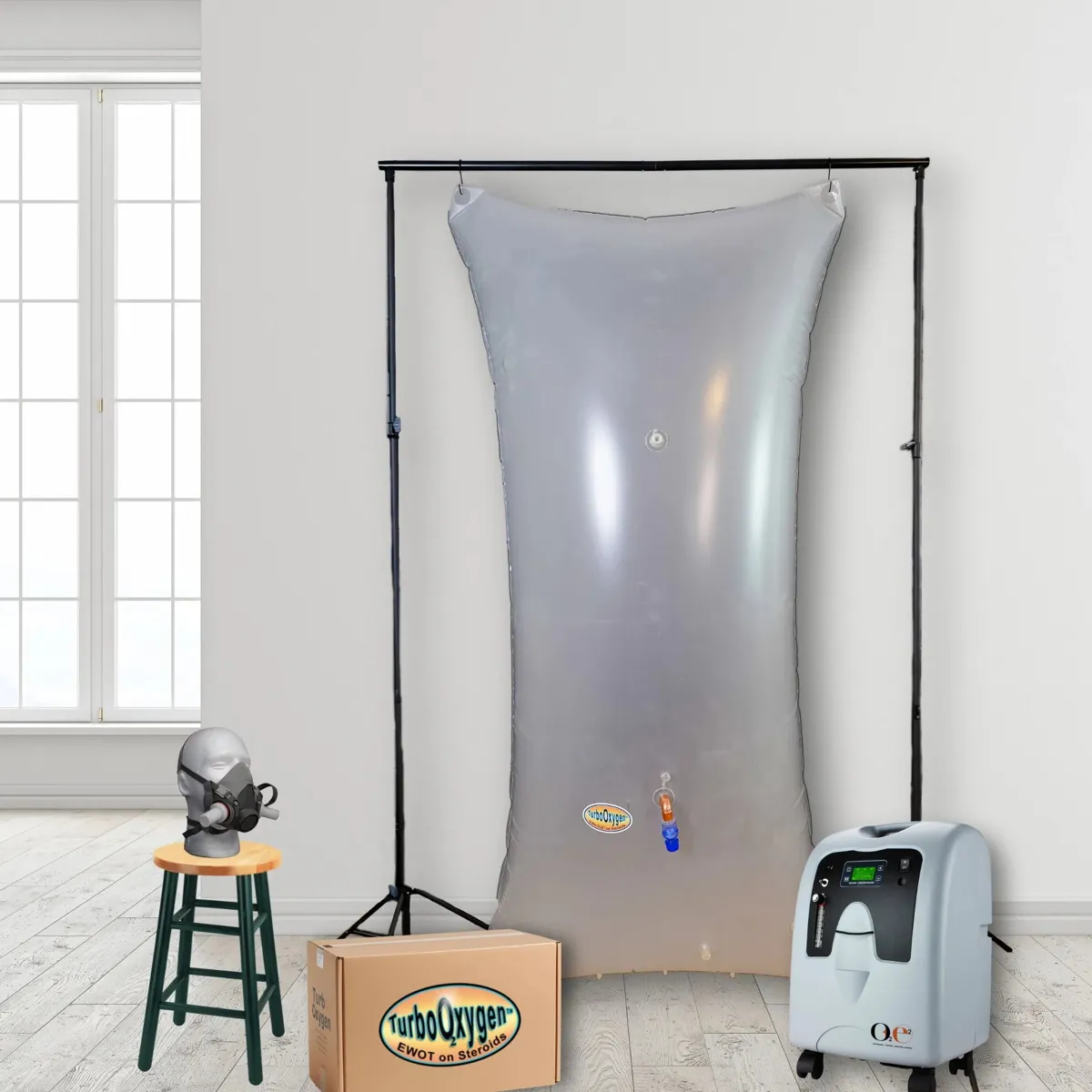
A simple setup.
A comfortable routine.
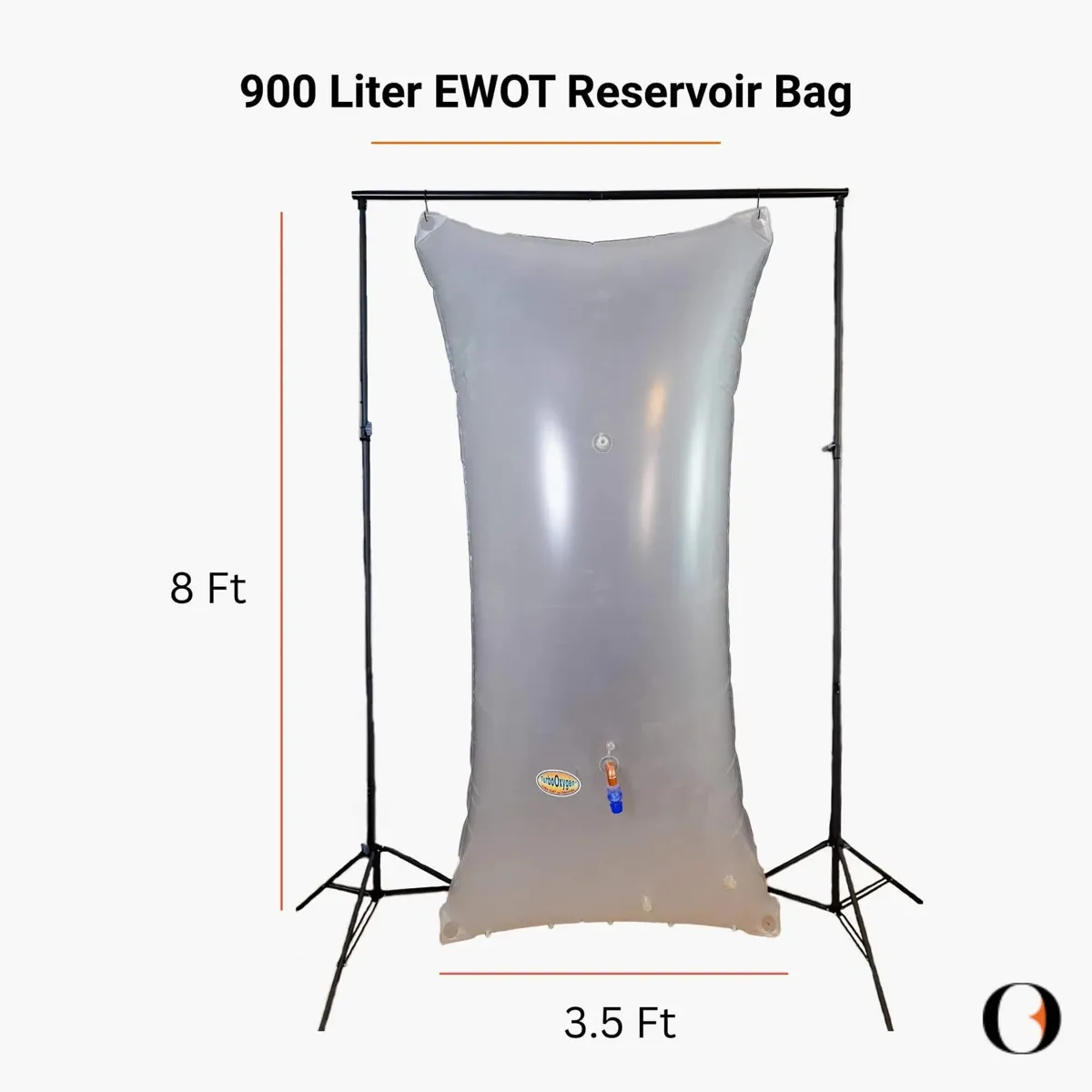
Oxygen reservoir capacity
Bag fill at maximum flow
Beginner session duration
Welcome to Turbo Oxygen!
Thank you for choosing Turbo Oxygen.
Your EWOT System is designed to combine exercise with supplemental oxygen in a simple, convenient setup that you can use from the comfort of your home.
EWOT stands for Exercise With Oxygen Therapy. During an EWOT session, you exercise while breathing oxygen supplied through the system.
Please read this manual before your first session and keep it handy for future reference. It will guide you through setup, operation, cleaning, maintenance, and troubleshooting.
Safety comes first. Oxygen supports combustion and can cause materials to ignite more easily.
Read safety information →Important safety information
Please read all safety instructions before using your EWOT System.
Oxygen Safety
Oxygen supports combustion and can cause materials to ignite more easily.
- Keep the system away from open flames, cigarettes, incense, candles, gas stoves, and other sources of heat or ignition.
- Do not smoke while using or while near the EWOT System.
- Do not use the system near flammable liquids, oils, grease, or aerosol products.
- Keep the oxygen equipment in a clean, dry, and well-ventilated area.
- Never use oil, grease, or petroleum-based products on oxygen connections or equipment.
- Keep oxygen tubing away from hot surfaces.
Electrical Safety
- Use the system with a properly grounded electrical outlet.
- Check the power cord before each use. Do not use the machine if the cord or plug is damaged.
- Keep electrical components away from water and other liquids.
- Do not operate the system with wet hands.
- Do not block the concentrator's air vents.
- Allow adequate space around the concentrator for proper ventilation.
- If the electrical supply in your area is unstable, use appropriate electrical protection as recommended by a qualified electrician.
Exercise Safety
EWOT is intended to be used together with physical exercise.
- Begin with an exercise intensity that is appropriate for your current fitness level.
- Increase exercise intensity gradually rather than starting with strenuous exercise.
- Stay hydrated during exercise.
- Stop exercising if you feel unwell, unusually breathless, dizzy, weak, or uncomfortable.
- If you experience significant or persistent symptoms, seek appropriate medical attention.
Keep Away From Children
The EWOT System contains tubing, connectors, and other small components that may present a choking or entanglement hazard.
Keep all components out of reach of children when the system is not in use.
Know your EWOT system
Before setting up your system, familiarize yourself with the main EWOT System Components.
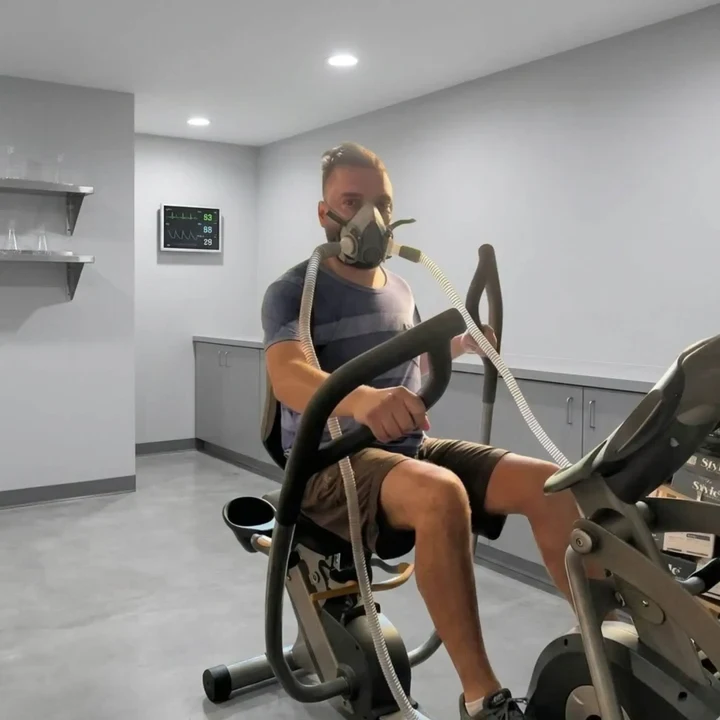
Exercise with your EWOT system
During an EWOT session, you exercise while breathing oxygen supplied through the system.
Product and system-in-use images supplied by Turbo Oxygen.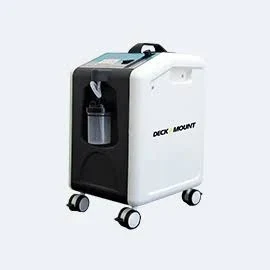 01
01
Oxygen Machine
Takes in room air, filters out nitrogen, and concentrates it to 93–96% oxygen.
 02
02
Oxygen Reservoir Bag
Stores oxygen produced by the oxygen machine and provides a steady supply of oxygen during the EWOT session.
 03
03
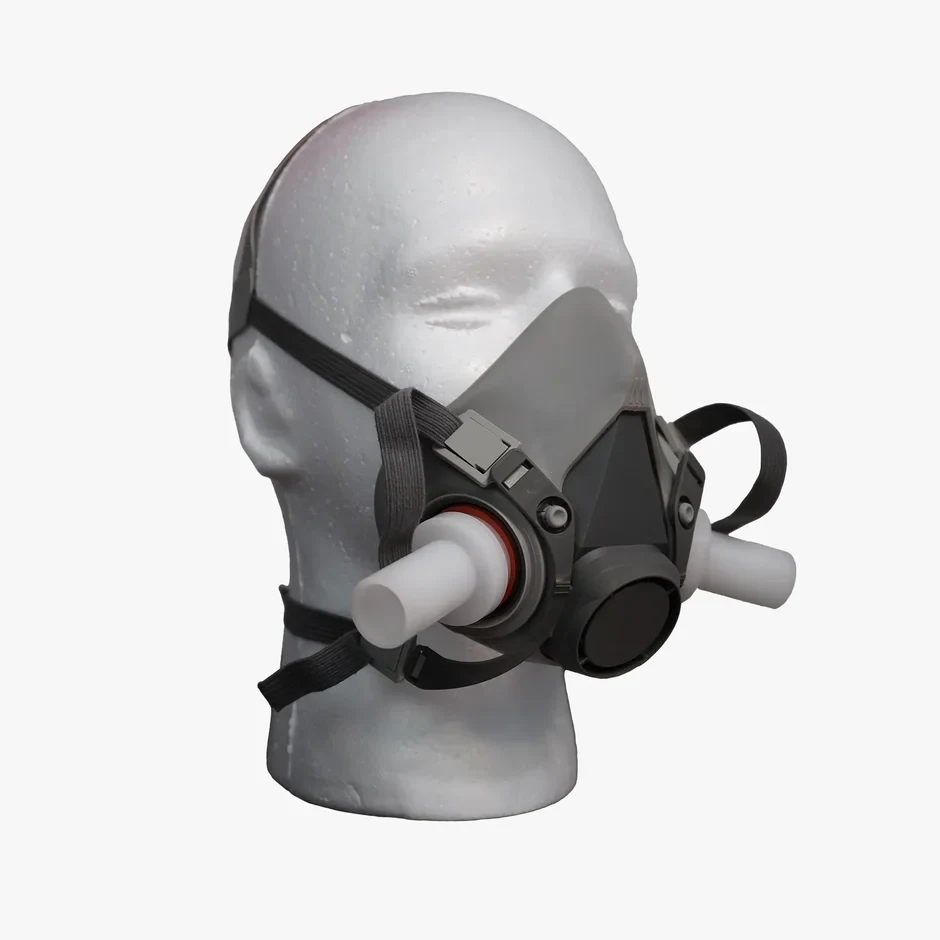
Turbo Mega-Flow Mask
This U.S. PATENTED dual-inlet Turbo Mega-Flow Mask delivers oxygen stored in the Reservoir Bag.
 04
04
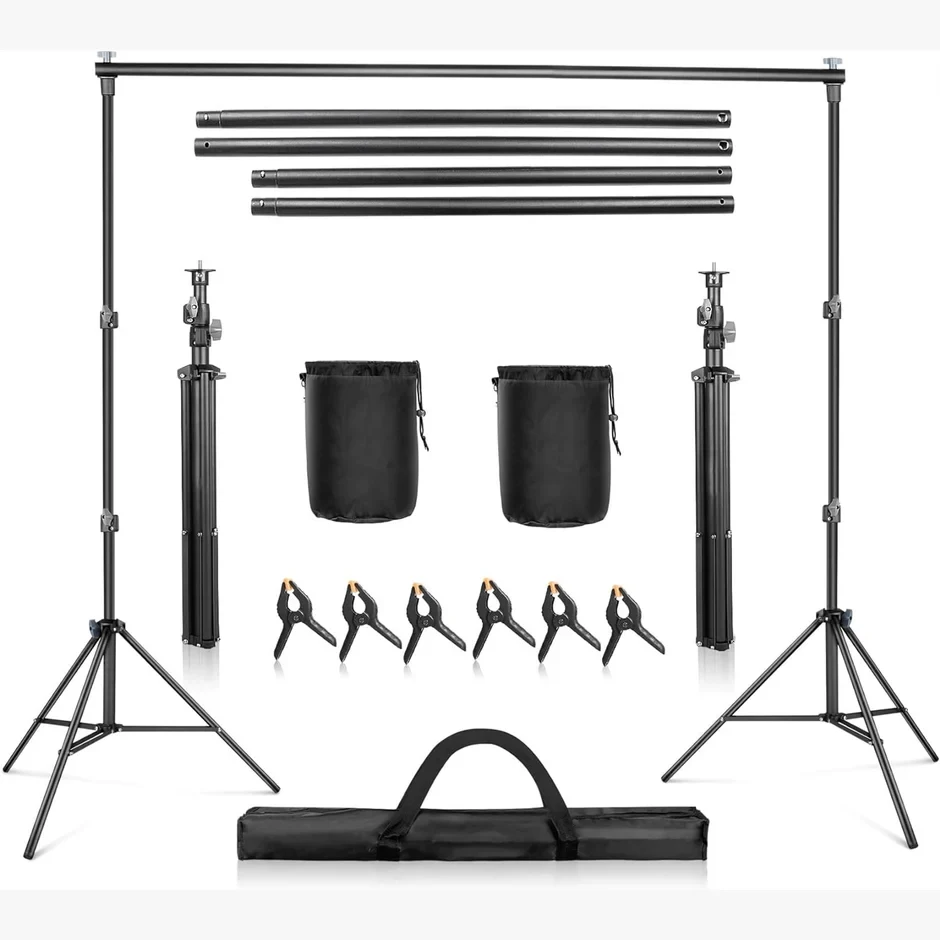
Compatible Bag Stand
To mount the Oxygen Reservoir Bag either horizontally or vertically.
 05
05
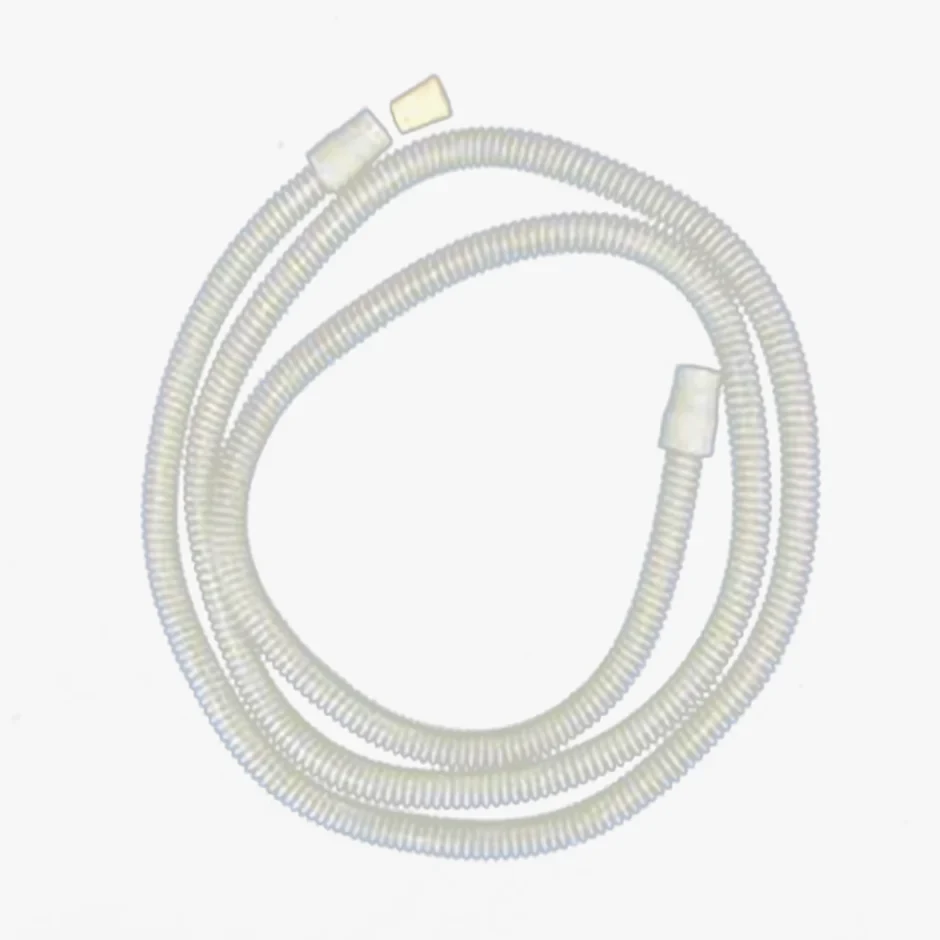
Connector Hoses / Adapters
Used to connect the different components of the system.
 06
06
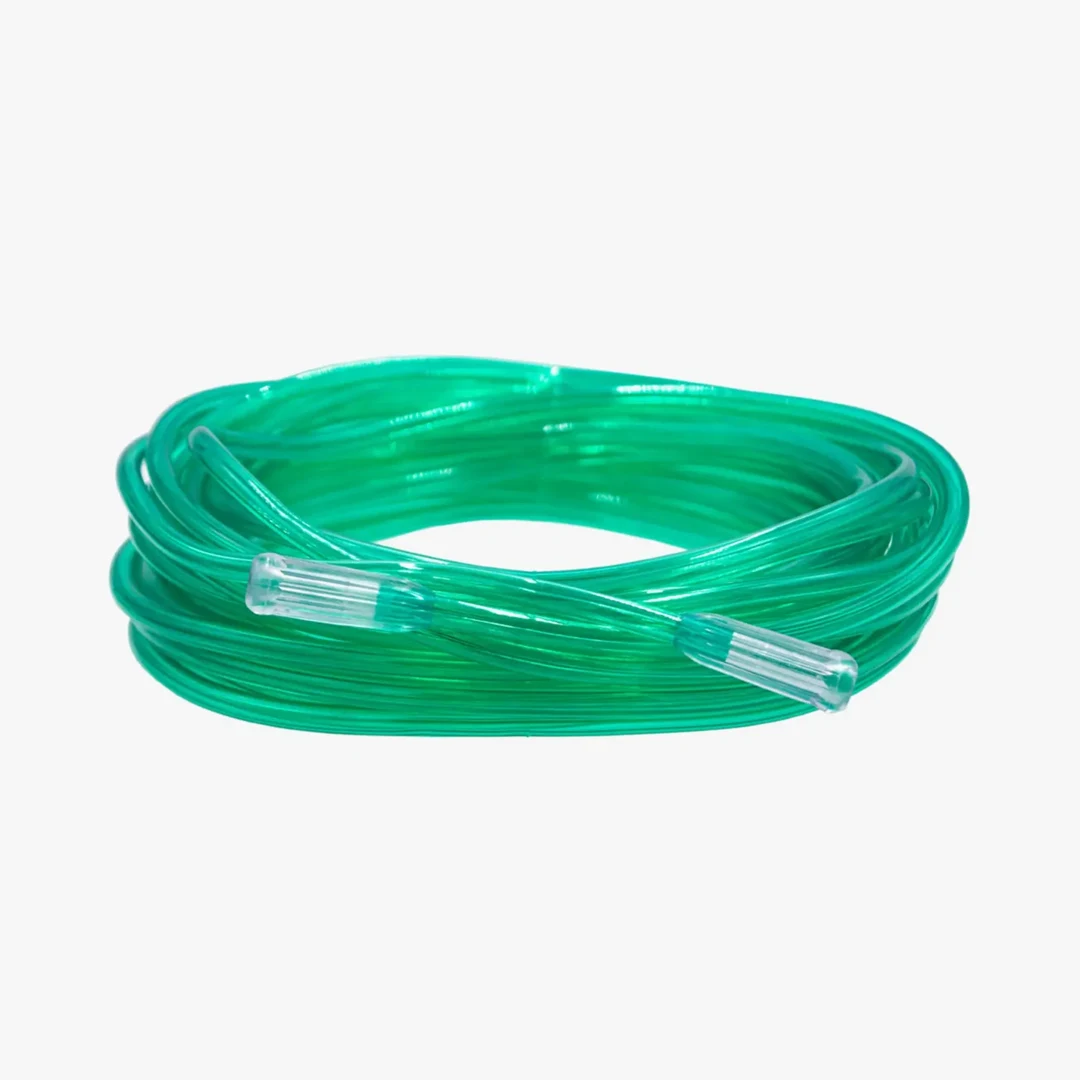
Oxygen Tubing
Connects the Oxygen Machine to the Oxygen Reservoir Bag.
What’s in the package?
Your Turbo Oxygen EWOT System arrives in 3 separate packages:
Oxygen Machine Package
Humidifier bottle is not required for EWOT.
Oxygen Reservoir Bag Package
Stores oxygen generated by the Oxygen Machine.
Our U.S. PATENTED Turbo Mega-Flow Mask comes with a dual-inlet design. It is available in 3 sizes.
Oxygen Supply Hose connects the Oxygen Machine to the Reservoir Bag.
A large connector hose that connects/transports O₂ from the Reservoir Bag to the Turbo Mega-Flow mask.
Used to close the Bag to Mask Connector Hose when not in use.
This valve, attached to the Oxygen Reservoir Bag, protects the bag from excessive overfilling. This can put less internal pressure on the seams and outlets.
Used to attach the Oxygen Reservoir Bag to the ceiling vertically.
For the secure mounting of the Oxygen Reservoir Bag.
To close off O₂ inlet bag feeder nipples not being connected to oxygen machines.
Bag Stand Package
Metal alloy poles with adjustable height.
Connect the support stands horizontally at the top.
To secure the crossbar.
Elastic string clips that prevent the stand from sagging or shifting.
Weighted bags filled with sand that anchor each support stand to the ground.
Portable storage case.
Before you begin
Before setting up your Turbo Oxygen EWOT System for the first time, please take a few minutes to go through the following steps.
01Make Sure You Have All Three Packages
Your EWOT System is shipped in three separate packages: the Oxygen Machine, Oxygen Bag, and Bag Stand.
Before beginning the setup, please make sure you have received all three packages.
02Check the Components
Open each package carefully and check that the components are present and free from visible damage.
If you notice any damage or if anything appears to be missing, please contact TurboOxygen Customer Support for assistance.
03Choose a Suitable Location
Set up your EWOT System where you have enough room to exercise comfortably and safely. Place the oxygen machine on a stable, level surface in a clean, dry, and well-ventilated area, away from direct heat and open flames. Keep the machine away from walls, curtains, furniture, and other objects that could block the air vents. Make sure there is sufficient space around the machine for proper airflow and ventilation.
04Keep Your Exercise Equipment Ready
Have your exercise equipment ready before starting the setup. This may be a treadmill, exercise bike, elliptical/cross trainer, or any other suitable exercise equipment that allows you to exercise safely and comfortably. Position the equipment so that the oxygen tubing can reach you without being stretched, kinked, or creating a tripping hazard.
05Check the Electrical Supply
Make sure a suitable electrical outlet is available near the oxygen machine. Before plugging in the machine, check that the power cord and plug are undamaged.
06Read the Safety Information
Before your first session, read the Important Safety Information in this manual carefully.
Once you have confirmed that all three packages are present, the components are undamaged, and your exercise area is ready, you can proceed with setting up your Turbo Oxygen EWOT System.
Exercise options
Choose an activity that suits your fitness level and allows you to exercise comfortably.
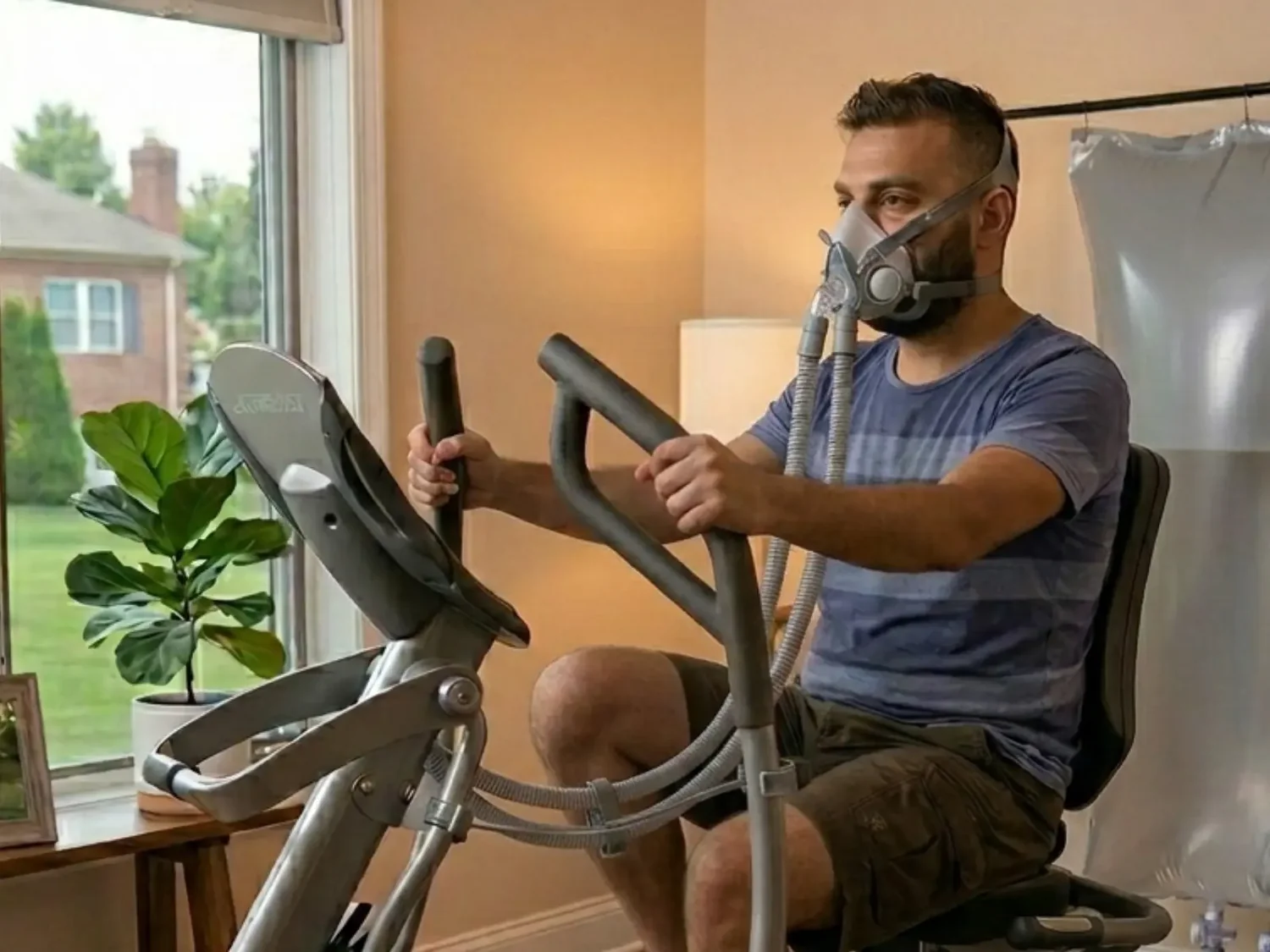
You can use Turbo Oxygen with suitable cardio equipment, such as a treadmill, elliptical (or cross trainer), stationary bicycle, or rower. Choose an activity that suits your fitness level and allows you to exercise comfortably.
You can still exercise with Turbo Oxygen without investing in an exercise machine. Simple movements such as walking in place, step-ups, and bodyweight squats can help you stay active during your session. Choose movements that suit your fitness level and allow you to maintain a steady, controlled pace. If you're new to exercise or returning after a break, start with a comfortable intensity and gradually increase it as your fitness improves.
Before every session
Check the following before beginning your exercise.
0 of 6 checks complete
Contact us if a component appears damaged or does not function properly.
Setting up your EWOT system
Follow the steps below to set up your Turbo Oxygen EWOT System and prepare for your first session.
01Set Up the Bag Stand
Assemble the support stands to your desired height and lock them in place using the quick-action levers. Connect the three crossbar sections together and place them across the tops of the two support stands. Adjust the width as needed and make sure the stand is stable before hanging the bag.
02Hang the Oxygen Reservoir Bag
- Carefully hang the oxygen reservoir bag securely on the bag stand. The bag can be positioned either horizontally or vertically.
- Make sure the bag is properly supported and securely attached to the stand before connecting the tubing.
- Ensure that the pressure relief valve attached to the bag is turned to its maximum counter-clockwise (anti-clockwise) position.
03Fill the Oxygen Reservoir Bag
- Using the 14-foot oxygen tubing, connect the oxygen machine to one of the five nipples on the oxygen reservoir bag. Make sure the connection is secure.
- Plug the oxygen machine into a suitable electrical outlet and switch it on.
- Adjust the flow meter to the desired flow rate.
- Allow the oxygen machine to fill the reservoir bag completely before starting your session. At the maximum flow rate, it takes approximately 90 minutes to fill the bag completely.
04Connect the Bag-to-Mask Connector Hoses
- Connect one end of each 6-foot hose to the outlets on the oxygen reservoir bag. Make sure both hoses are securely connected.
- Place the supplied stoppers (black corks) on the open ends of both 6-foot hoses.
05Put on the Mask
Put on the Dual-Inlet Turbo Mega Flow Mask. Adjust and tighten the head strap so that the mask fits comfortably and securely over your face.
06Connect the Mask
Once you are ready to begin your session, remove the stoppers (black corks) from the ends of both 6-foot hoses. Connect the two mask inlets to the two 6-foot hoses. Make sure both connections are secure before beginning your exercise.
07Start Exercising
- Begin your chosen exercise while breathing oxygen through the mask.
- Start at a comfortable intensity and maintain an exercise pace that is appropriate for your fitness level.
08Complete Your Session
- A standard EWOT session is 15 minutes. If you’re a beginner, start with 8-10 minute sessions for 3-5 days a week and gradually increase the duration and frequency as your body adapts to the increased oxygen levels.
- When you have completed your session, stop exercising and follow the instructions in “After Your Session” to safely disconnect and store the system.
- Repeat the steps from 3 to 8 for each subsequent session. Ensure the reservoir bag is adequately filled before starting your next session.
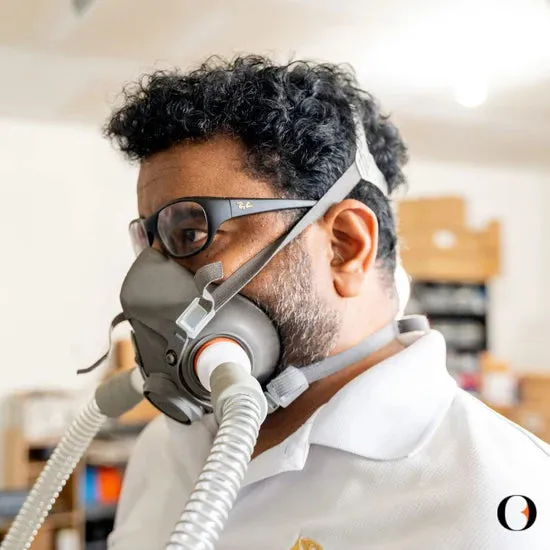
Unique Dual-Inlet Design
Adjust and tighten the head strap so that the mask fits comfortably and securely over your face. Make sure both connections are secure before beginning your exercise.
Image: Turbo Oxygen ↗After your session
Safely disconnect and store the system, ready for your next session.
- After completing your 15-minute session, stop exercising and remove the mask from your face.
- Disconnect both 6-foot hoses from the bag and place the stoppers (black corks) back on the open ends.
- Place the mask and hoses in a clean, dry, and dust-free area so it is ready for your next session. Make sure the mask is placed away from dust, moisture, direct sunlight, and excessive heat.
Cleaning & maintenance
Proper care can help keep your Turbo Oxygen EWOT System in good condition.
Oxygen Machine
- Keep the oxygen machine's exterior clean and free of dust.
- Make sure the air vents remain unobstructed.
- Follow the maintenance recommendations provided in the oxygen machine user manual.
Oxygen Reservoir Bag
- Keep the reservoir bag in a clean and dry area.
- Inspect the bag regularly for visible damage, loose connections, or signs of leakage.
- Do not use sharp objects near the bag.
Turbo Mega-Flow Mask
Regular cleaning helps maintain the hygiene and condition of your Turbo Mega-Flow Mask. Follow the recommended cleaning procedure to keep your mask clean and ready for your next session.
For hygiene reasons, the mask is intended for individual use only. Do not share your mask with others.
Cleaning Frequency: Once a week
What You Need
- Warm water (not exceeding 49°C)
- Mild, neutral detergent
- A soft-bristled brush
- Clean water
- A clean, dry towel
Steps
- 01Immerse the mask in warm water not exceeding 49°C.
- 02Add a mild, neutral detergent and gently scrub the mask with a soft-bristled brush.
- 03Rinse the mask thoroughly with fresh, clean, warm water to remove all detergent residue.
- 04Allow the mask to air-dry completely in a clean, uncontaminated area before storing or using it again.
Important Precautions
- Do not use detergents containing lanolin, oils, or other oily ingredients.
- Do not use solvents, strong detergents, abrasive cleaners, or harsh chemicals, as these may damage the mask.
- Do not use the mask until it is completely dry.
- For hygiene reasons, use a separate mask for each person.
Hoses
- Keep the tubing clean, dry, and free from kinks.
- Inspect the tubing regularly for cracks, damage, or loose connections.
- Do not wash or immerse the hoses in water.
Note
- When not in use, store the system in a clean, dry location away from direct sunlight, moisture, excessive heat, and open flames.
- Avoid placing heavy objects on the oxygen bag or tubing.
Troubleshooting
If you experience a problem with your Turbo Oxygen EWOT System, identify the issue and follow the recommended steps.
Find the recommended checks
Choose the component and the issue you’re noticing. The guide opens the matching instructions from your manual.
No matching issues. Try “flow”, “leak”, or another component.
Oxygen Machine troubleshooting
The machine does not turn on
The power light remains off when the power switch is turned on. An audible alarm may sound and the Service Required light may flash.
The power cord is not properly connected.
Check that the power cord is securely connected to the machine and the wall outlet.
No power at the wall outlet.
Check the home’s circuit breaker. If necessary, reset the breaker and try a different wall outlet.
The machine’s circuit breaker has been activated.
If your unit is equipped with a circuit breaker button, check the breaker located below the power switch and reset it if required. If the problem occurs again, try a different wall outlet and contact Turbo Oxygen Support if the issue continues.
Red Service Required light is illuminated
The machine turns on, but the red Service Required light is illuminated. An audible alarm may sound.
The air intake filter is blocked or dirty.
Check the air intake filter. If it is dirty, clean it according to the maintenance instructions in the oxygen machine user manual.
Exhaust is blocked.
Check the exhaust area and make sure nothing is blocking the machine’s exhaust. Allow sufficient space around the machine for proper ventilation.
Oxygen tubing is blocked or kinked.
Check the oxygen tubing for obstructions or kinks. Disconnect the oxygen tubing from the oxygen outlet and check whether normal flow is restored.
Low-frequency vibration or unusual sound
The machine operates, but a low-frequency vibration or unusual sound is detected.
The shipping tie at the bottom of the machine has not been removed.
Turn off the machine and unplug it from the electrical outlet. Carefully place the machine on its side, cut the shipping tie, and remove it.
Normal Oxygen and Low Oxygen lights
Both the green Normal Oxygen light and the red Low Oxygen light are illuminated or remain off.
Possible oxygen concentration malfunction.
Stop using the machine and contact Turbo Oxygen Customer Support.
The red Low Oxygen light is illuminated
The flow meter is not set correctly.
Check that the flow meter is set to the desired flow rate.
Oxygen flow is reduced or interrupted
Tubing is kinked, blocked, or disconnected.
Check the oxygen tubing and all connections. Straighten any kinks and make sure the tubing is securely connected.
The machine continues to alarm after the above checks
A machine fault may be present.
Switch off the machine and unplug it. Do not attempt to open or repair the machine yourself. Contact Turbo Oxygen team for assistance.
Oxygen Reservoir Bag troubleshooting
The bag does not fill
The oxygen machine is not supplying oxygen.
Make sure the oxygen machine is switched on and operating normally. Check that the 14-ft oxygen feeder tubing is securely connected to both the machine and the bag.
The bag is filling slowly
The flow rate is set too low.
Check the flow meter and make sure it is set to the desired flow rate.
Tubing is kinked or obstructed.
Check the 14-ft oxygen feeder tubing along its entire length. Straighten any kinks and make sure the tubing is not compressed or blocked.
Connection is loose.
Check both ends of the feeder tubing and make sure the connections are secure.
The bag does not fill completely
The pressure relief valve is not in the correct position.
Before filling the bag, make sure the pressure relief valve is turned fully counter-clockwise (anti-clockwise) to its maximum position.
Oxygen is escaping through a connection.
Check the bag’s nipples, tubing connections, and other fittings for loose connections or visible leakage.
The bag loses some volume overnight
The bag loses some volume after being left overnight or for an extended period.
Normal oxygen loss through the pressure relief valve.
The pressure relief valve may release a small amount of oxygen over time. Refill the bag before your next session.
The bag loses significant volume within a short period
Possible leak in the bag, seams, nipples, or connections.
Carefully inspect the bag, seams, nipples, and connections for visible signs of leakage. If you identify a leak, stop using the bag and contact Turbo Oxygen Customer Support.
The bag appears to have a leak
Possible damage to the bag or seam.
Do not attempt to repair the bag using materials not approved by Turbo Oxygen. Contact our customer support team for assistance.
The bag becomes overfilled
The oxygen machine continues supplying oxygen after the bag has reached its intended capacity.
Turn off the oxygen machine and check the pressure relief valve. Do not intentionally overfill the bag, as this may cause unnecessary stress on the bag or its connections.
Oxygen is escaping from the bag connections
Loose or improperly fitted connection.
Check each connection and make sure the tubing and fittings are properly seated and secure.
The pressure relief valve is releasing oxygen
Pressure inside the bag has reached the valve’s relief point.
A small release of oxygen may occur through the pressure relief valve. Check that the valve is in the correct position before filling and avoid overfilling the bag.
The bag is not holding oxygen between sessions
Oxygen may be escaping through the feeder hose, pressure relief valve, or a leak.
Replace the stopper/cap on the appropriate hose or oxygen input nipple after filling. Check the bag and connections for leaks. If significant volume is lost, contact Turbo Oxygen Customer Support.
Turbo Mega-Flow Mask troubleshooting
No oxygen flow through the mask
Make sure both 6-ft hoses are securely connected to the mask and bag. Check that the stoppers have been removed and the hoses are not kinked.
Weak or uneven oxygen flow
Check both hoses for kinks, blockages, or loose connections. Make sure both mask inlets are securely connected.
Mask feels loose
Adjust the head strap so the mask fits securely and comfortably over your nose and mouth.
Oxygen is escaping around the mask
Reposition the mask and adjust the head strap to achieve a comfortable, secure fit.
Mask or hose is damaged
Do not use damaged components. Contact Turbo Oxygen Customer Support for assistance.
Mask needs cleaning
Clean the mask according to the cleaning instructions in this manual and allow it to dry completely before reuse.
Important do’s and don’ts
A few essentials to keep your system working safely.
Do’s
- Read this manual before your first session.
- Place the oxygen machine in a clean, dry, well-ventilated area.
- Keep the machine's air vents clear.
- Check the bag, tubing, mask, and connections before each session.
- Keep the bag securely supported on the bag stand.
- Exercise at a comfortable intensity appropriate for your fitness level.
- Replace the stoppers on the 6-ft hoses after each session.
- Store the mask and components in a clean, dry, dust-free area.
Don’ts
- Don't smoke or use open flames near the oxygen system.
- Don't place the system near heat sources or flammable materials.
- Don't use oil, grease, or petroleum-based products on oxygen equipment.
- Don't block the oxygen machine's air vents.
- Don't intentionally overfill the oxygen reservoir bag.
- Don't use damaged bags, tubing, masks, or connectors.
- Don't allow the hoses to become kinked or create a tripping hazard.
- Don't open, modify, or attempt to repair the oxygen machine yourself.
- Don’t share your mask with others. Use a separate mask for each person.
Frequently asked questions
Quick answers from your Turbo Oxygen manual.
No matching answers. Try “session”, “clean”, or “bag”.
How long should an EWOT session be?
A standard EWOT session is 15 minutes. If you’re a beginner or haven’t exercised for a while, start with 8–10 minute sessions. Gradually increase the duration, frequency, and exercise intensity as your body becomes adapted to exercising with increased oxygen delivery.
Does the oxygen reservoir bag need to be completely full?
For a standard 15-minute session, we recommend filling the reservoir bag completely before starting your exercise.
How long does it take to fill the bag?
At the maximum oxygen flow rate, the reservoir bag takes approximately 90 minutes to fill completely.
What type of exercise can I do with Turbo Oxygen?
You can use Turbo Oxygen while engaging in suitable cardio exercise such as walking, treadmill exercise, stationary cycling, or cross training. Choose an activity that you can perform safely and comfortably.
How hard should I exercise?
Exercise at an intensity that is appropriate for your fitness level. If you are new to EWOT or exercise, begin comfortably and gradually build your routine.
What should I do if I feel uncomfortable during a session?
Stop exercising and remove the mask. If you experience significant or persistent symptoms, seek appropriate medical attention.
How should I store the mask after use?
Disconnect the hoses, replace the black stoppers, and store the mask in a clean, dry, dust-free area, away from moisture, direct sunlight, and excessive heat.
What if the bag, tubing, or mask appears damaged?
Do not use damaged components. Contact Turbo Oxygen Customer Support for assistance.
Technical specifications
Your system, at a glance.
Oxygen Reservoir Bag
- Capacity
- 900 liters
- Material
- Thermoplastic Polyurethane (TPU)
- Dimensions (W × H)
- 3.5 × 8 ft
- Pressure Relief Valve
- Attached to the bag
Turbo Mega-Flow Mask
- Material
- Thermoplastic Elastomer (TPE)
- Valves
- One-way valves
- Available Sizes
- Small, Medium, and Large
- Head Strap
- Adjustable
Warranty & support
We’re here to help you get the most out of your Turbo Oxygen EWOT System.
Warranty period
Your Turbo Oxygen EWOT System is covered by warranty for manufacturing defects under normal and intended use.
The warranty applies to the Oxygen Machine, Oxygen Reservoir Bag, and Turbo Mega-Flow Mask. Accessories and other components supplied with the system are not covered under the product warranty.
The warranty does not cover damage resulting from improper use, installation, accidents, misuse, neglect, unauthorized modification or repair, failure to follow the instructions in this manual, normal wear and tear, or improper storage and maintenance.
Please retain your order details or proof of purchase for warranty service. If you experience an issue with a covered component, contact Turbo Oxygen Customer Support for assistance.
Customer support
We’re here to help you get the most out of your Turbo Oxygen EWOT System.
If you have questions about setup, operation, troubleshooting, warranty, or replacement of a covered component, please contact Turbo Oxygen Customer Support at hello@turbooxygen.in.
Please keep your order number and purchase details available when contacting us. For technical issues, sharing photos or videos of the problem may help our support team assist you more quickly.

Keep this guide close.
Ready for your next session? Check the essentials first.
Back to your pre-session check →